Skip to content
INDEPENDENT SOFTWARE. OPEN POSSIBILITIES.

Your everyday.
A little more
extraordinary.

Organize your tabs with Ocal Browser, record a walkthrough with Ocal Screen, or play your music and films with Ocal Media Player.

For Windows 10 & 11 · Free & open source
GOOD SOFTWARE.
NO STRINGS ATTACHED.
Open source, always
Privacy comes first
Built to feel effortless

Explore Ocal software

Choose an app to see its features, supported platforms, and downloads.

OCAL BROWSER

Less friction.
More flow.

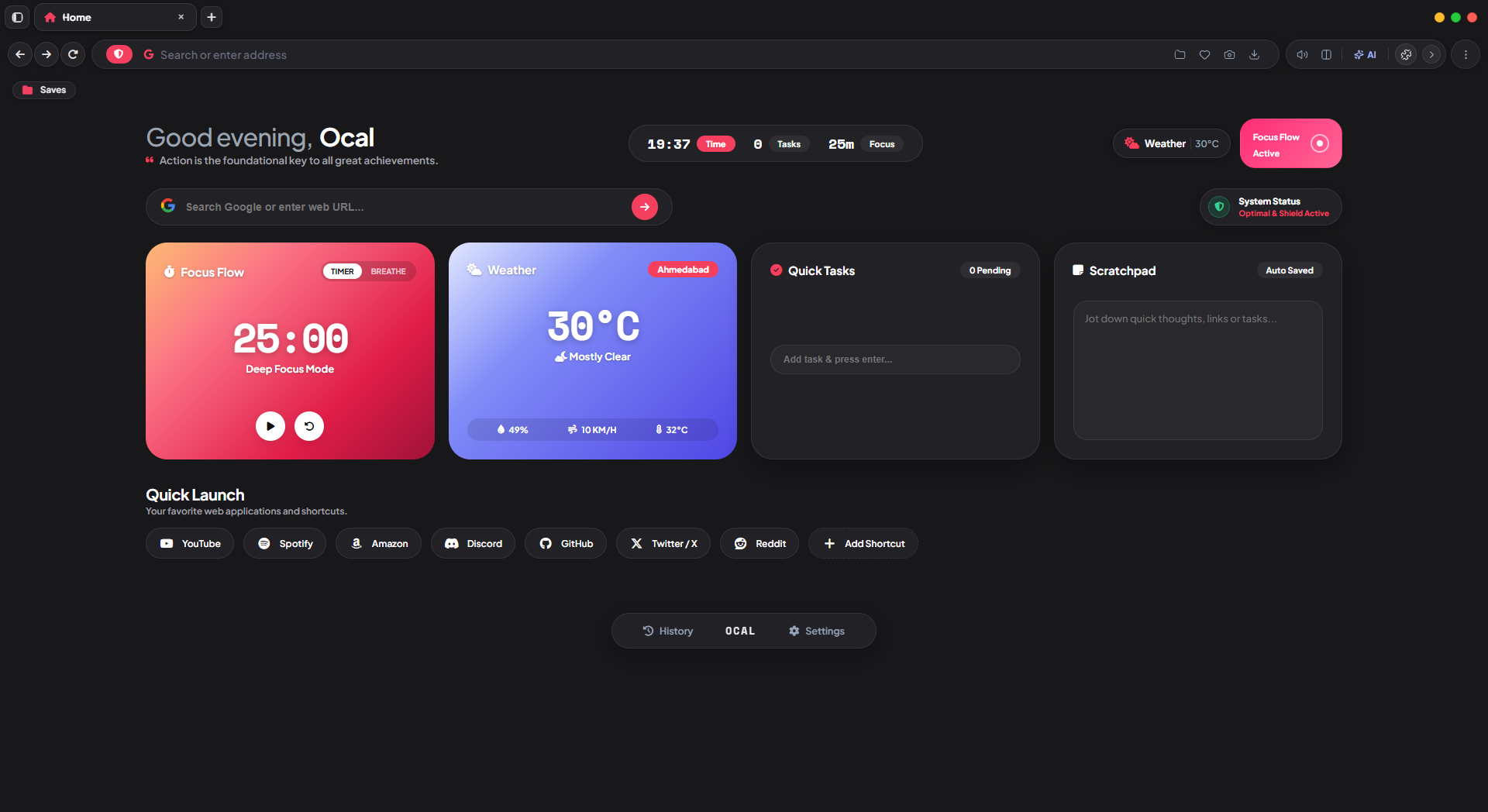
Start a focus timer, jot down a note in the scratchpad, and open your saved shortcuts from the same start page.

Meet your next browser
A SPACE THAT FEELS LIKE YOU
Ocal Browser in dark mode, showing the focus timer, quick tasks, scratchpad, and shortcuts
One home for your everyday browsing.Explore features
FROM FIRST TAKE TO FINAL CUT
OCAL SCREENScreen + audio
Your next great idea, on screen.
CAPTUREEDITCREATE
Recording workflow illustration
OCAL SCREEN

Show it.
Don’t just explain it.

Turn a walkthrough, a quick demo, or a bright idea into a video worth sharing. Record and refine with Ocal Screen.

  • Screen recording and video editing
  • Smart zoom and cursor effects
  • A workflow that stays on your device
Discover Ocal Screen
OCAL MEDIA PLAYER

Your music and films
on Windows 11.

Play local audio and video files with Ocal Media Player. Reopen a film to resume where you left off, or switch equalizer presets when you plug in your headphones.

  • 14 formats, including FLAC, MP3, MKV, and MP4
  • 13 equalizer presets
  • Windows installer and portable ZIP
Explore Ocal Media Player
Ocal Media Player
Windows 11
Your music, your way

Find your sound.

A little space to listen.
LibVLC
Preview paused
Interactive player preview
02 — A DIFFERENT APPROACH

Your tools should work for you.
It’s that simple.

See the source
01

Personal means personal.

Your browser and your creative workspace should feel like your own. Privacy is part of how we build, from the start.

02

Nothing behind the curtain.

Explore the code, follow the development, or contribute an idea. Better software starts with an open conversation.

03

Less in your way.

Purposeful features and straightforward interfaces help you spend less time managing your tools and more time doing your thing.

A FEW GOOD QUESTIONS

Before you
make yourself at home.

Explore the catalog
Is Ocal free to use?

Yes. Ocal Browser and Ocal Screen are free, open-source tools. You can explore the projects and their releases on GitHub.

Which platforms are supported?

The main Browser download is for Windows 10 and 11. Media Player is built for Windows 11. The catalog lists available packages, including the Android browser, for each release.

Can I install just one app?

Yes. Browser, Screen, and Media Player each have their own download. Choose the app you want from the software menu.

How can I contribute or report an issue?

Visit the community page to get involved, or open an issue in the relevant GitHub repository. Reproducible bug reports, feature ideas, and code contributions are welcome.
MAKE ROOM FOR SOMETHING BETTER

A fresh start.
One download away.

Better tools for your next tab, take, and big idea.

Get Ocal Browser Browse all downloads Free & open source · Windows 10 / 11